System Dashboard
Control and monitor the health of your Pi from one place.
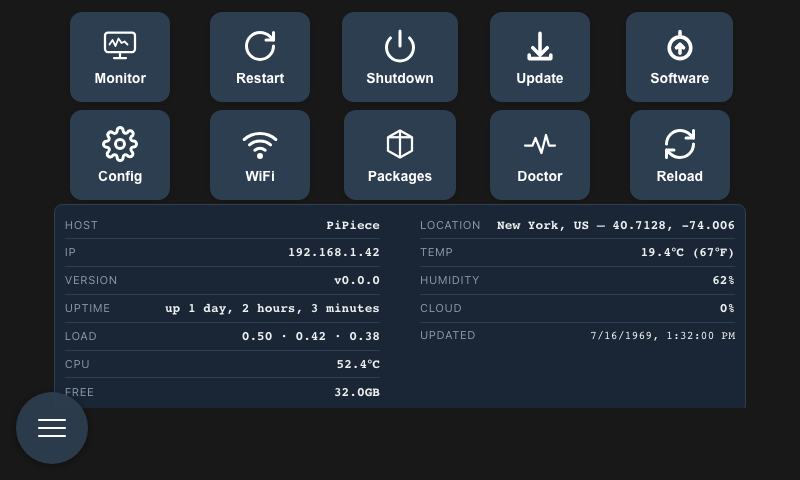
Available Actions
Status
Shows the current system uptime. Useful for checking whether the Pi has rebooted unexpectedly.
Restart
Reboots the Pi. A confirmation dialog appears first — confirm to proceed. The UI will be unavailable for about 30–60 seconds while the system restarts.
Shutdown
Powers off the Pi safely. A confirmation dialog appears first. Use this before physically disconnecting power.
Update (OS)
Runs a system package update (apt upgrade). Opens a streaming log view so you can watch progress in real time. See System Updates for details.
Software
Checks for a new version of PiPiece and lets you apply it with one click. See System Updates for details.
Config
Opens the configuration editor where you can adjust PiPiece environment variables. See Configuration for details.
Reload
Refreshes the browser UI. Useful after a software update or if the interface seems out of sync.
System Information
The dashboard also shows a live summary of the Pi's current state:
- Hostname and IP address — for connecting from other devices
- Uptime — how long the Pi has been running
- CPU temperature — watch this if the Pi is under heavy load
- Load average — 1, 5, and 15 minute averages
- Memory — used vs total
- Disk — storage used vs available
- Weather — current conditions if configured